How to Force a Trade in MLB The Show 25
The grass isn't always greener on your current team's side in MLB The Show 25. Fortunately, San Diego Studio's baseball simulation gives players flexibility when seeking new opportunities. Here's how to orchestrate a trade in MLB The Show 25 Road to the Show mode.
Understanding Your Career Path Options
After completing your high school career in Road to the Show, you face two pivotal choices: develop further in college or immediately join the team that drafted you. While both paths let you influence your eventual MLB destination, professional sports careers are fluid enough that circumstances may warrant a change.
The Shift in Trade Mechanics
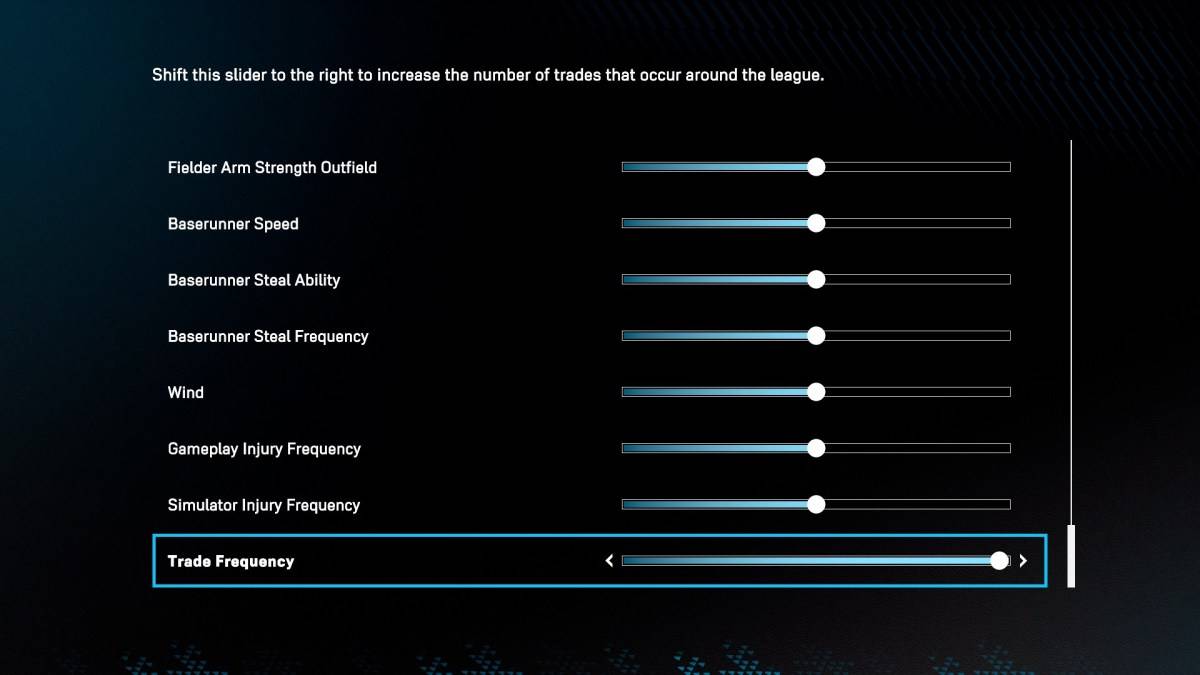
Past versions permitted direct trade requests upon reaching the majors, but MLB The Show 25 has simplified this process. Instead of formal requests, players now leverage the game's Trade Frequency slider in the Road to the Show settings. Adjusting this setting to maximum significantly increases trade activity - including potential movement involving your player.
The Trade Process Explained
After increasing trade activity, focus on building league recognition through strong performances. Once your player generates interest, your agent will notify you about potential trades. Carefully evaluate these opportunities, as consistently rejecting offers may decrease future interest. When you identify your preferred destination, accept the trade and consider readjusting the Trade Frequency slider.
For additional MLB The Show 25 tips, explore our recommended pitching settings guide.
MLB The Show 25 is currently available in Early Access on PlayStation 5 and Xbox Series X|S platforms.
Latest Articles