ニュース PlayStation VR2をPCに接続します:簡単な手順

PlayStation VR2をPCに接続します:簡単な手順

著者 : Leo アップデート : May 26,2025

PlayStation VR2をゲーミングPCに接続し、SteamVRの広範なゲームライブラリを探索する機会を熱心に期待している場合は、Sonyがこれを可能にしたことを知ってうれしいです。昨年秋、彼らはシステムがヘッドセットの最小要件を満たしている場合、PS VR2が最新のゲームPCとのインターフェースを可能にする60ドルのアダプターをリリースしました。ただし、PCでPS VR2をセットアップするには、アダプターに接続するだけではありません。特にPCの構成に応じて、考慮すべきいくつかのニュアンスがあります。

アダプターでPCに接続する方法

セットアップの旅に着手する前に、必要なすべてのコンポーネントがあることを確認してください。 PS VR2は、アダプターとともに使用する場合、ほとんどのSteamVRゲームと互換性があります。 Bluetooth 4.0機能、Displayport 1.4ケーブル、無料のAC電源アウトレット、およびSteamでインストールされたPlayStation VR2とSteamVRアプリの両方にPCが必要です。 PS VR2のセンスコントローラーがUSB-Cを介して充電され、2つのUSB-Cポートとケーブルが必要であることを忘れないでください。または、より便利なソリューションのためにSonyから50ドルのSenseコントローラー充電ステーションを選択できます。

必要なもの
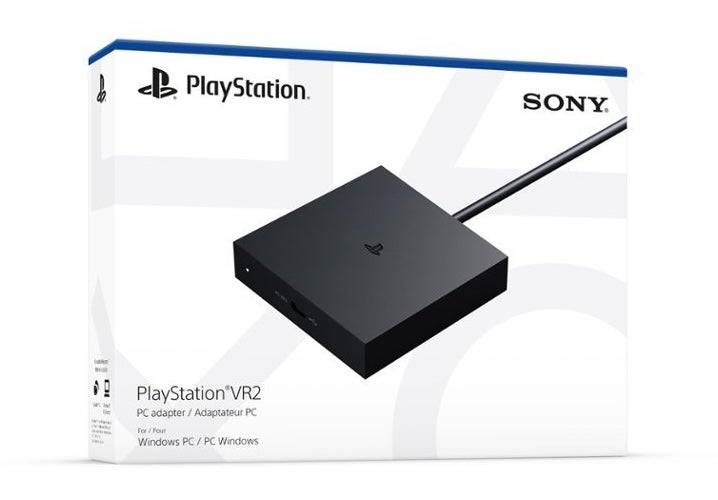
在庫に戻る#### PlayStation VR2 PCアダプター

7 Amazonでそれを見てください

まず、Gaming PCがSonyの公式PS VR2 PCアダプターの準備ページにアクセスして、PlayStation VR2ヘッドセットをサポートできるかどうかを確認します。システムが要件を満たしている場合は、以下を収集します。

  • PlayStation VR2ヘッドセット
  • PlayStation VR2 PCアダプター(ACアダプターと男性USB 3.0タイプAケーブルを含む)
  • displayport1.4ケーブル(個別に販売)
  • PC上の無料のUSB 3.0 Type-Aポート(Sonyは、拡張ケーブルまたは外部ハブを使用することに対してアドバイスしますが、駆動型の外部ハブはテストでうまく機能しました)
  • PCのBluetooth4.0機能(内蔵または外部Bluetoothアダプター経由)
  • SteamとSteamVRはPCにインストールされています
  • Steam内にインストールされたPlayStation VR2アプリ

接続方法:ステップバイステップの手順

すべてを手にして、次の手順に従ってPS VR2をPCに接続します。

  1. SteamVRとPlayStation VR2アプリをインストールします

    • まだいない場合は、 Steam Windowsクライアントをダウンロードしてインストールしてください。
    • 蒸気を開いて、 SteamVRアプリをインストールします。
    • PlayStation VR2アプリをダウンロードしてインストールします。
  2. PCのBluetoothをセットアップし、センスコントローラーをペアリングします

    • PCのスタートメニューから[設定]> [Bluetooth]&Devicesに移動し、Bluetoothを「ON」に切り替えます。
    • 各センスコントローラーで、PlayStationボタンを押し続け、白い光が点滅するまでボタンを作成し、それらが発見可能であることを示します。
    • [Bluetooth&Devices]ページの[デバイスの追加]をクリックし、[Bluetooth]を選択し、PlayStation VR2 Senseコントローラー(L)および(R)を検索して接続します。
    • PCに組み込みのBluetooth 4.0がない場合は、ASUS BT500のような互換性のあるBluetoothアダプターの使用を検討してください。
    • 内部Bluetooth無線と外部アダプターを備えたシステムの場合、競合を回避するために、デバイスマネージャーを介して内部Bluetoothドライバーを無効にします。
  3. アダプターをセットアップしてPCに接続します

    • PS VR2アダプターを、PCの未使用のUSB 3.0 Type-Aポートに差し込みます。
    • DisplayPort 1.4ケーブルを使用して、アダプターをGPUに接続します。
    • AC電源アダプターをコネクタのPS VR2アダプターのDCに取り付け、電気コンセントに接続します。
    • 電源が入ると、アダプターのステータスインジケータは無地に変わります。
    • Adapterの前面にあるUSB-Cポートを使用して、PlayStation VR2をPCアダプターに接続します。
  4. ハードウェアアクセラレーションのGPUスケジューリングをオフにする(オプション)

    • 40シリーズのような新しいGPUを搭載したPCの場合、NVIDIA RTXカード、安定したVRエクスペリエンスのハードウェアアクセラレーションGPUスケジューリングを無効にします。
      • [設定]> [システム]> [表示]>グラフィックに移動します。
      • [デフォルトのグラフィック設定]をクリックします。
      • 「ハードウェアアクセラレーションのGPUスケジューリング」スライダーをオフにして、PCを再起動します。
  5. PlayStation VR2アプリとSteamVRを起動します

    • PS VR2ヘッドセットの電源は、振動するまで中央のボタンを保持します。
    • SteamVRを起動し、デフォルトのOpenXRランタイムとして設定します。
    • デスクトップでPlayStation VR2アプリを開き、Sense Controllersのファームウェアを更新し、プレイエリアと好みをセットアップします。
    • 画面およびヘッドセットの指示に従って、IPD、表示距離、ヘッドセットのフィットを調整します。
    • セットアップが完了したら、SteamVRゲームに飛び込み、VRエクスペリエンスをお楽しみください!

アダプターなしでPCに接続できますか?

現在、アダプターなしでPS VR2をPCに接続することは簡単ではありません。短い答えはノーです。ただし、一部のユーザーは、USB-CポートとVirtuallinkテクノロジーを備えた2018年頃から特定のGPUを使用して成功したと報告しています。伝えられるところによると、この方法は、PlayStation VR2アプリがインストールされている場合、PS VR2への直接接続を可能にするため、アダプターの必要性をバイパスします。詳細な洞察については、 VRへのRoadに関するレポートをご覧ください。

最新記事

もっと
Oceanhorn: Chronos Dungeon Sequel Unveiled The highly anticipated sequel to the beloved action-adventure RPG Oceanhorn has officially been unveiled, promising to take players on an even deeper dive into the mythical world of Aethera. Titled Oceanhorn: Chronos Dungeon, the new game builds upon the foundation of its critically acclaimed predecessor while introducing groundbreaking mechanics, a richly expanded lore, and a dynamic time-manipulation system that redefines how players interact with the world. Key Features: Time-Bending Gameplay: At the heart of Chronos Dungeon is a revolutionary time-altering mechanic. Players can rewind, fast-forward, and pause time in specific zones to solve intricate puzzles, alter environmental events, and reshape combat encounters. For example, you might rewind a collapsing bridge to retrieve a lost relic or fast-forward through a storm to reach a hidden temple before it's buried. Expanded Open World: The world of Aethera has grown tenfold, with new regions like the Shattered Isles, the Chronos Wastes, and the Floating City of Elyra. Each area offers unique ecosystems, ancient ruins, and time-locked dungeons that change based on the player’s actions. New Protagonist & Destiny: While the original game followed the journey of a young warrior seeking to reclaim his father’s legacy, Chronos Dungeon introduces a new hero—Kaelen, a time-walker cursed with the ability to see fragments of alternate timelines. His mission: prevent the unraveling of time itself, as an ancient entity known as The Chronophage threatens to consume all of existence. Dual Combat System: Combining melee, magic, and time-based abilities, the combat system has been completely overhauled. Use "Chrono-Strike" to freeze enemies mid-attack, or "Temporal Parry" to deflect incoming blows and send them back in time. Each enemy has a "time pattern" that must be analyzed to exploit weaknesses. Dynamic Storytelling: Choices made throughout the game affect the flow of time, leading to branching storylines and multiple endings. Certain events may only occur if you visit a location at a specific point in time—or if you’ve completed a side quest in a different timeline. Co-op & Multiplayer Mode: For the first time in the series, Chronos Dungeon features a cooperative multiplayer mode where up to four players can team up to explore time-locked dungeons. Each player controls a different time variant of Kaelen, allowing for complex team-based time manipulation to overcome environmental puzzles. Visual & Audio Evolution: Developed by Savage Games (creators of the original Oceanhorn) with state-of-the-art Unreal Engine 5 technology, Chronos Dungeon boasts breathtaking visuals, realistic time-dilation effects, and an immersive orchestral score composed by Arisa Tanaka (known for her work on Final Fantasy XV and Hades). Release Details: Platforms: PlayStation 5, Xbox Series X|S, PC (Steam, Epic Games Store), and Nintendo Switch (enhanced version) Release Date: March 2025 Deluxe Edition Includes: Digital artbook, soundtrack, exclusive in-game skins, and early access to the multiplayer beta. Developer Statement: "We’ve always believed that Oceanhorn was more than just a game—it was a journey through myth, memory, and meaning. With Chronos Dungeon, we’re not just continuing that journey. We’re turning it inside out, twisting it in time, and asking: what if every choice you made changed not just your fate, but the fate of the world itself? This isn’t just a sequel. It’s a new legend." Oceanhorn: Chronos Dungeon is set to redefine the action-RPG genre and reignite the magic of a franchise that captured the hearts of millions. Prepare to step into the timestream—and change it forever. 🔥 Coming March 2025. Time waits for no one. 読む