
Application Description
OPlayer is a state-of-the-art media playback app designed for Android, celebrated for its adaptability and rich feature set. As a premier HD video player for Android tablets and smartphones, it excels with wide-ranging codec compatibility, handling formats like MKV, MP4, AVI, MOV, FLV, WMV, RMVB, and more. The app goes beyond simple playback, placing a premium on user privacy with its unique Gesture Unlock system while enabling smooth viewing with Ultra HD support and hardware decoding. Combined with multitasking tools, Chromecast streaming, and integrated file management, OPlayer is a versatile all-in-one solution that also performs as an excellent music player, redefining expectations for Android media applications.
Robust security via gesture lock technology
Among Android media players, OPlayer demonstrates notable sophistication, with its Gesture Unlock for video security being a prime example of its advanced design. At a time when digital privacy is crucial, the app takes a leading position by letting users protect their videos with a personalized gesture password. This creative solution boosts the app’s attractiveness and directly responds to users’ need for strong security over personal or sensitive media. While OPlayer offers many premium features—like Chromecast support, multitasking, and broad format compatibility—the Gesture Unlock function is a key differentiator, highlighting its dedication to user privacy and securing its status as a top contender in the Android media player arena.
All-encompassing file format support
OPlayer distinguishes itself as an outstanding media player through its unmatched dedication to format versatility. It supports a vast selection of video formats, including MKV, MP4, M4V, AVI, MOV, 3GP, FLV, WMV, RMVB, TS, and others, exceeding common expectations to let users enjoy their preferred content smoothly, without the hassle of converting files. This inclusive approach removes typical compatibility frustrations and reinforces OPlayer’s goal of providing a holistic media experience, where users can easily play a wide variety of video formats with exceptional simplicity and convenience.
Additional premium functionalities
- Ultra HD video playback: OPlayer elevates video quality with its Ultra HD capabilities, enabling fluid 4K playback. By utilizing hardware acceleration, it delivers an engaging viewing experience with remarkable detail.
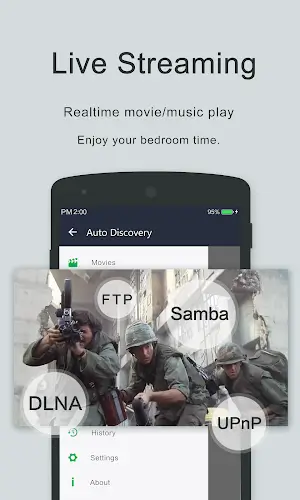
- Chromecast integration: The app expands its usefulness by letting users stream videos to a TV via Chromecast. This creates a more cinematic experience by effortlessly linking to larger screens.
- Subtitle downloader and more: OPlayer includes practical extras like a built-in subtitle downloader, catering to viewers who rely on captions. Its attention to such details reflects a clear focus on user satisfaction.
- Multitasking capabilities: OPlayer supports multitasking through a pop-up window, split-screen viewing, and background video playback. You can watch content while using other apps or listen to videos playing in the background like music.
- Night mode, quick mute & playback speed control: For a personalized experience, OPlayer provides night mode, instant mute, and adjustable playback speed. Users can adapt settings to their preferences and surroundings.
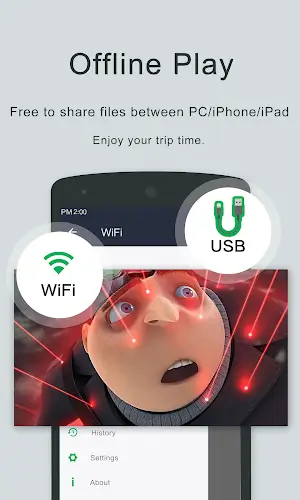
- Comprehensive file management: More than just a player, OPlayer includes a fully-featured file manager. Organize, move, cut, paste, and share video files directly within the app.
- Audio playback excellence: OPlayer also excels as a high-quality music player, supporting numerous audio formats such as WMA, FLAC, MP3, OGG, MIDI, AMR, AAC, DTS, and M4A.
- User-friendly interface: With its intuitive layout, OPlayer gives users direct control. Adjust volume, brightness, and playback progress simply by sliding on the screen during playback.
Final thoughts
OPlayer represents the ongoing advancement of media playback on Android. Its focus on versatility, security, and user-centered features makes it an essential application for anyone wanting a complete and satisfying multimedia experience. Whether you're watching videos, enjoying music, or organizing your media collection, OPlayer establishes a new benchmark for quality among Android media players.
Screenshot

Reviews
Apps like Video Player - OPlayer












Trending apps








Top News






Latest Apps






Latest Articles