ni esto: localizar todas las agujas de urdimbre protegidas
Esta guía detalla las ubicaciones de las 85 agujas de urdimbre en Infinity Nikki. Las agujas de urdimbre son cruciales para viajar rápidamente y acceder a los reinos, comenzando con el ámbito de la escalada. Activar cada aguja es esencial para su uso. Para teletransportarse, localice la aguja en el mapa, resalte y seleccione la opción Teleport.
todas las agujas de deformación en el infinito Nikki
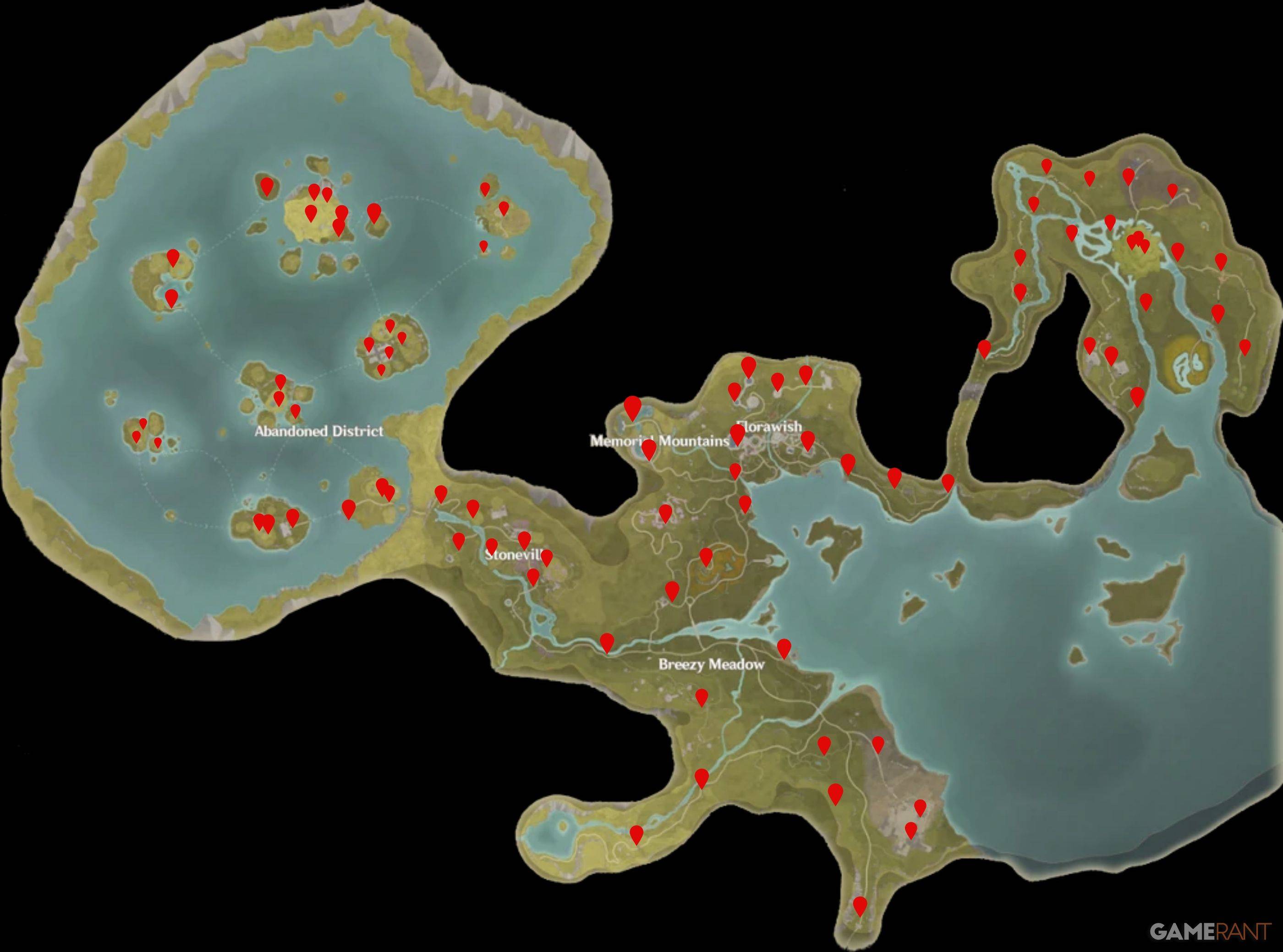
Montañas Memoriales Warp Spires
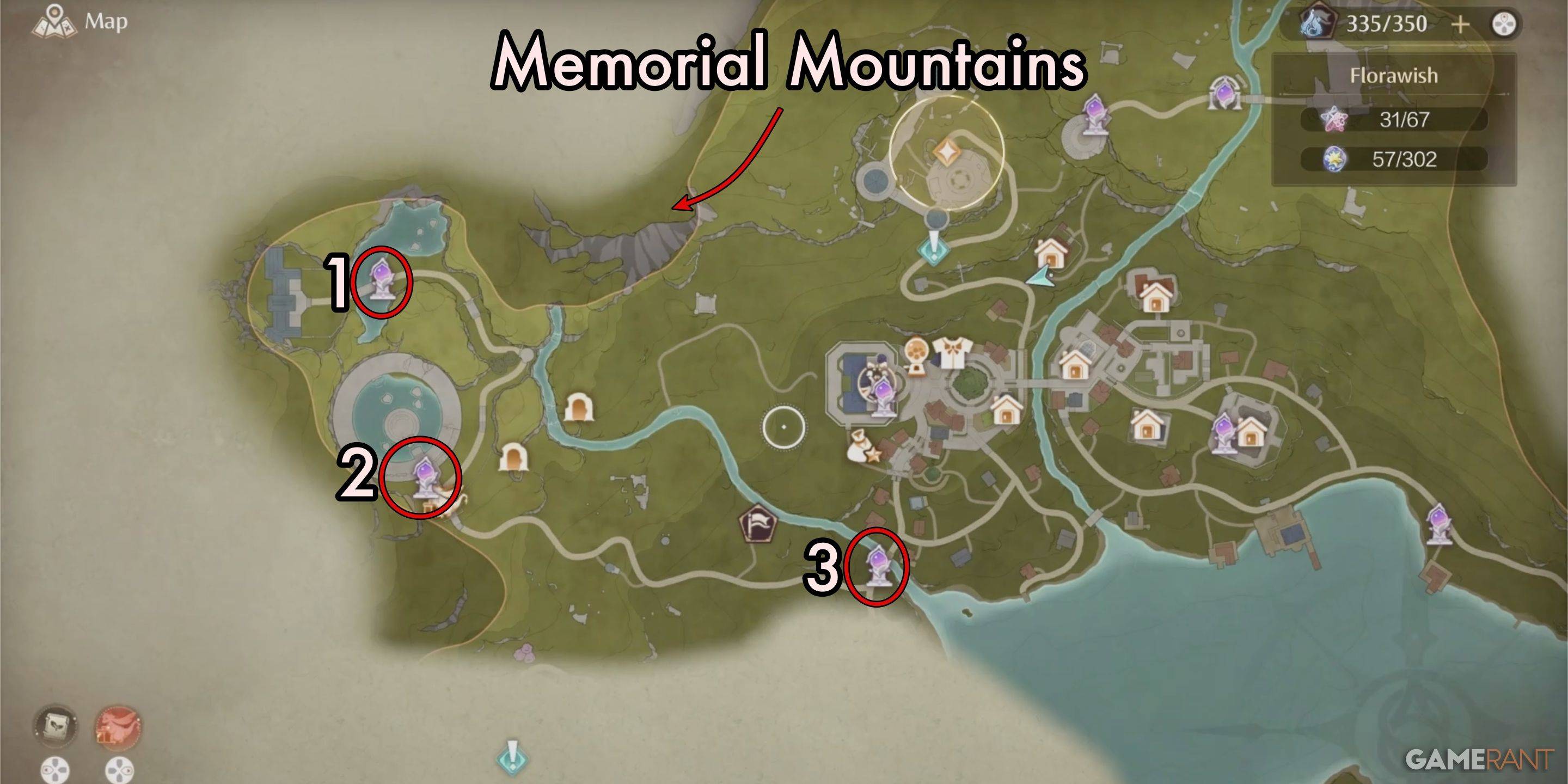
| Spire Number | Warp Spire Name |
|---|---|
| 1 | By the Stylist's Guilds Memorial |
| 2 | Beside the Statue in the Old Florawish Memorial |
| 3 | Florawish Lane |
Florawish Warp Spires
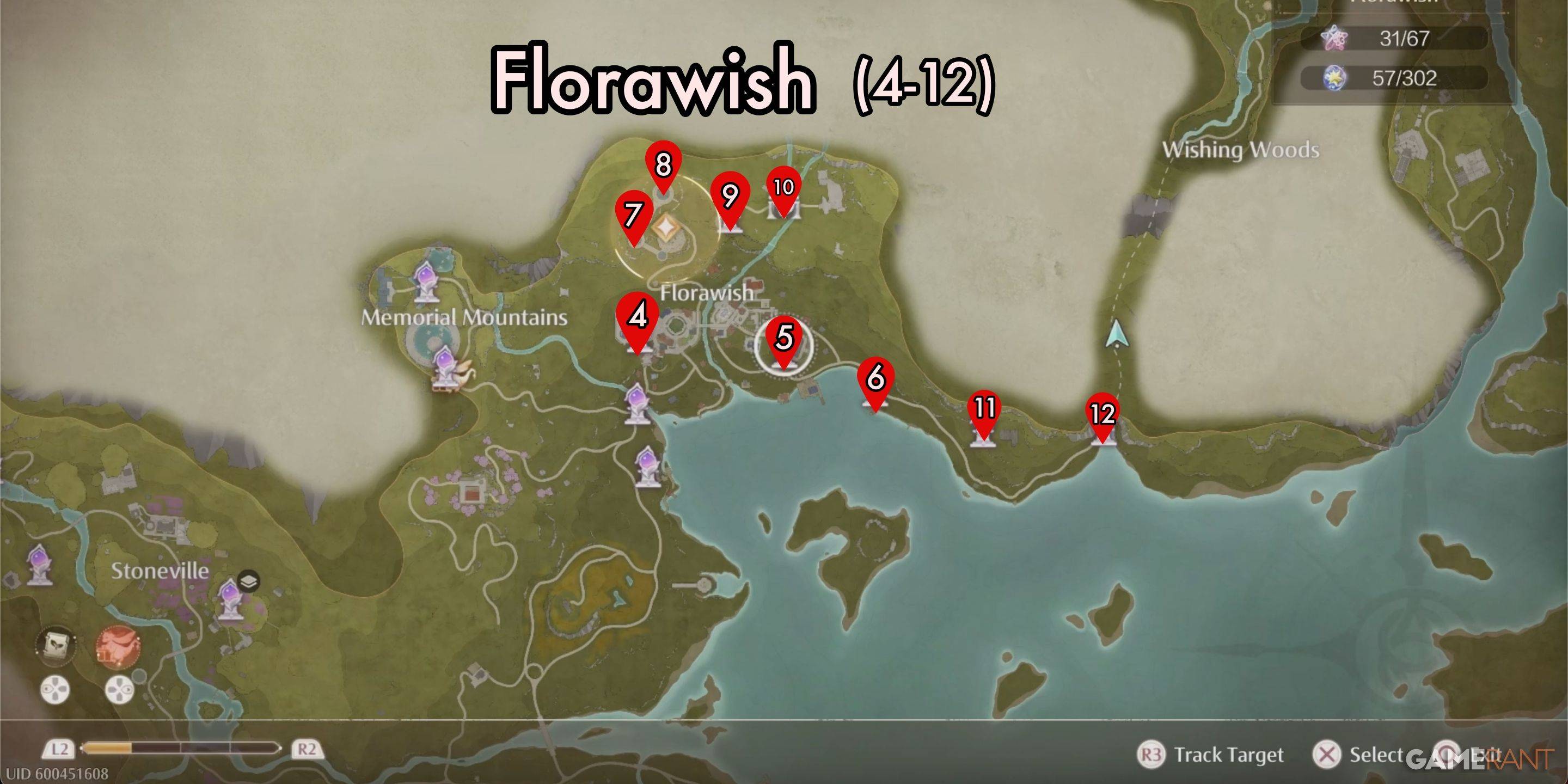
| Spire Number | Warp Spire Name |
|---|---|
| 4 | Stylist's Guild Front Gate |
| 5 | In Front of the Mayor's Residence |
| 6 | Stitch Street |
| 7 | Dream Warehouse Tower |
| 8 | Dream Warehouse Rooftop |
| 9 | Secret Base |
| 10 | Well of Fortune |
| 11 | In Front of the Sanctum of the Observant |
| 12 | Wish Pass |
Breezy Meadow Warp Spires
| Spire Number | Warp Spire Name |
|---|---|
| 13 | The Leisurely Anglers Florawish Branch |
| 14 | Cicia Art Academy Field Base |
| 15 | Bug Catcher's Cabin |
| 16 | Meadow Activity Support Center |
| 17 | Meadow Wharf |
| 18 | Relic Hill |
| 19 | Lakeside Hill Lane |
| 20 | Queen's Palace Ruins Entrance |
| 21 | Queen's Palace Ruins Front Yard |
| 22 | Queen's Palace Ruins High Tower |
| 23 | Queen's Palace Ruins West Forest |
| 24 | Heartcraft Kingdom Outpost |
| 25 | Abandoned Fanatic Wisher Camp Outpost |
| 26 | Abandoned Fanatic Wisher Camp |
Stoneville Warp Spires
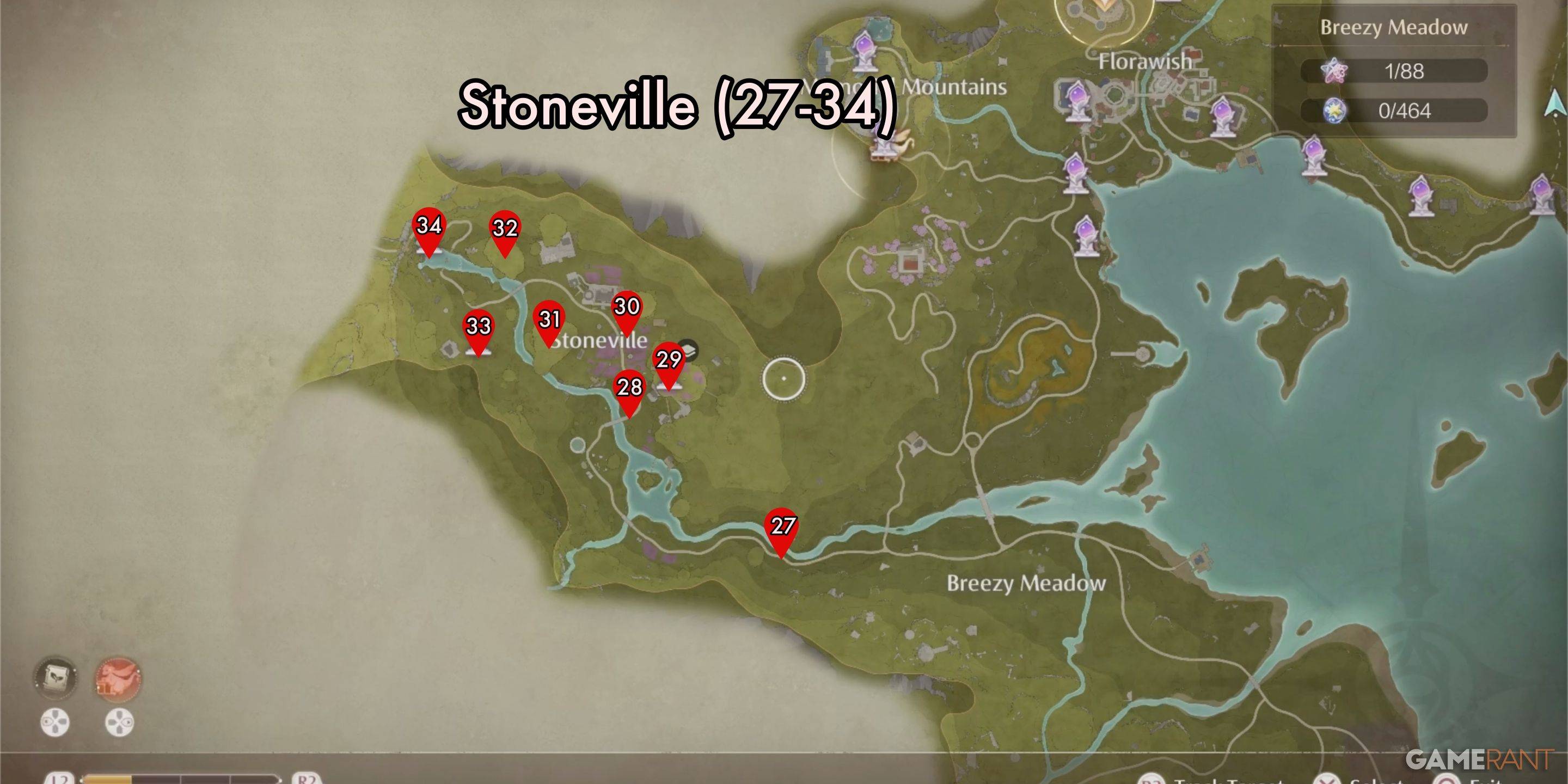
| Spire Number | Warp Spire Name |
|---|---|
| 27 | Stoneville Entrance |
| 28 | Village Fork |
| 29 | Flamecrest Stonetree |
| 30 | Lavenfringe Fields |
| 31 | Gliding Training |
| 32 | Dye Workshop |
| 33 | Cicchetto Manor |
| 34 | Rockfall Valley |
Sigres de urdimbre del distrito abandonado
| Spire Number | Warp Spire Name |
|---|---|
| 35 | Beside the Golden Fields |
| 36 | Golden Fields Stonetree Top |
| 37 | Golden Fields Old Dock |
| 38 | Beside the Ripple Wine Cellar |
| 39 | Barrel Grove |
| 40 | Barrel Home |
| 41 | Windrider Mill Entrance |
| 42 | Windrider Mill Top |
| 43 | Windrider Mill Mid-Level |
| 44 | Market of Mirth Entrance |
| 45 | Market of Mirth Summit Path |
| 46 | Handsome Lads Circus |
| 47 | Choo-Choo Station Old Platform |
| 48 | Choo-Choo Station Shipping Center |
| 49 | Choo-Choo Station Repair Station |
| 50 | Choo-Choo Station Stonetree Top |
| 51 | Ghost Train Entrance |
| 52 | Stellar Fishing Ground Trail |
| 53 | Stellar Fishing Ground Peak |
| 54 | Thuddy Squash Workshop |
| 55 | Volunteer Corps Jail |
| 56 | Stonecrown Peak |
| 57 | Waterspots Observatory |
| 58 | Volunteer Corps Watchtower 1 |
| 59 | Wishing Well |
| 60 | Volunteer Corps Watchtower 2 |
| 61 | Prosperville Entrance |
| 62 | Stone Steles |
| 63 | Forgotten Village Dwelling |
Deseando Woods Warp Spires
| Número de espira | Warp Spire Nombre |
|---|---|
| 64 | El laboratorio de belleza de Timi |
| 65 | Taller Waterwheel |
| 66 | Entrada de la granja |
| 67 | Bizarre Wish Hills |
| 68 | Desperation Orb Warehouse |
| 69 | Shoal |
| 70 | Grand Tree Shoal |
| 71 | Área residencial de Grand Tree |
| 72 | Templo de los deseos |
| 73 | Garrison de los Paladines |
| 74 | Swordsmith Ruins Entrance |
| 75 | Cascada de Flower Valley |
| 76 | Wish Celebration Center |
| 77 | Elderwood Riverbank |
| 78 | frente al centro de inspección de deseos |
| 79 | Wishcraft Lab |
| 80 | Swordsmith Ruins Gate |
| 81 | Ruinas de los Guardianes |
| 82 | cueva aislada |
| 83 | Campamento ascético |
| 84 | Aurosa Valley |
| 85 | Tierra de Starfall |
Esta lista completa asegura que no se perderá ninguna de estas ubicaciones vitales en su viaje infinito Nikki. Slope
Últimos artículos
Controllers and Sensors > Calibrate Joy-Con)
Cleaning the analog sticks (advanced DIY, risk of damage)
Contacting Nintendo Support for repair/replacement (if under warranty or eligible for free repair)
🔍 Tips to Avoid Issues:
Use a reliable HDMI cable (e.g., Amazon Basics, Belkin, or other well-reviewed HDMI 2.0 cables).
Keep Joy-Cons clean—wipe them regularly and avoid dusty environments.
Avoid extreme temperatures, which can affect performance.
Check for firmware updates on your Switch (Settings > System > System Update).
Summary:
⚠️ There is no "Nintendo Switch 2" or "Official Switch 2 HDMI Cable" yet.
✅ Use a high-quality HDMI 2.0 cable to avoid display issues.
❌ But it will not fix Joy-Con drift or connection problems.
If you're having Joy-Con issues, focus on calibration, cleaning, or getting official repair support, not cable replacement.
Let me know if you'd like recommendations for HDMI cables or how to fix Joy-Con drift!"
class="uk-flex uk-flex-middle">As of now, there is no official Nintendo Switch 2 released by Nintendo, so the idea of using an "Official Nintendo Switch 2 HDMI Cable" is not accurate or applicable. The current model available is the Nintendo Switch (2017), and its updated version, the Nintendo Switch OLED Model (2021).
However, if you're experiencing issues with your Joy-Cons—such as drifting, unresponsiveness, or poor connection—there are a few helpful tips to keep in mind, and using a proper HDMI cable can help rule out certain display-related issues, but it won't fix Joy-Con hardware problems directly.
Here's what you should know:
✅ Use a High-Quality HDMI Cable (Not Necessarily "Official")
The Nintendo Switch uses a standard HDMI 2.0 cable, not a proprietary one.
While Nintendo does sell an official HDMI cable, it's not required. A high-quality, certified HDMI 2.0 cable (or higher) will work just as well and often at a better price.
Avoid cheap or low-quality HDMI cables, as they can cause:
Flickering or distorted video
No signal (black screen)
Audio issues
If you're having display problems, test with a known working HDMI cable to rule out video issues.
❌ Joy-Con Drift Is Not Fixed by HDMI Cables
Joy-Con drift (where the stick moves on its own) is a hardware issue, typically caused by worn-out analog sticks or dust/contamination inside.
Using a different HDMI cable will not fix Joy-Con drift.
Solutions for drift include:
Calibrating the Joy-Con (Settings > Controllers and Sensors > Calibrate Joy-Con)
Cleaning the analog sticks (advanced DIY, risk of damage)
Contacting Nintendo Support for repair/replacement (if under warranty or eligible for free repair)
🔍 Tips to Avoid Issues:
Use a reliable HDMI cable (e.g., Amazon Basics, Belkin, or other well-reviewed HDMI 2.0 cables).
Keep Joy-Cons clean—wipe them regularly and avoid dusty environments.
Avoid extreme temperatures, which can affect performance.
Check for firmware updates on your Switch (Settings > System > System Update).
Summary:
⚠️ There is no "Nintendo Switch 2" or "Official Switch 2 HDMI Cable" yet.
✅ Use a high-quality HDMI 2.0 cable to avoid display issues.
❌ But it will not fix Joy-Con drift or connection problems.
If you're having Joy-Con issues, focus on calibration, cleaning, or getting official repair support, not cable replacement.
Let me know if you'd like recommendations for HDMI cables or how to fix Joy-Con drift!
Lectura
Boxbound: Android's Infinite Puzzle Game
A Conceptual Game Design Proposal
🎮 Title: Boxbound
📱 Platform: Android (with cross-platform potential)
🧩 Genre: Infinite Puzzle / Endless Runner / Hyper-Casual with Depth
🎯 Tagline: One box. Infinite possibilities.
🌟 Overview
Boxbound is an addictive, visually mesmerizing puzzle game designed for Android that blends the simplicity of block-based puzzles with the endless momentum of a runner. The player controls a single, colorful box that must navigate a procedurally generated maze of shifting platforms, gravity flips, and abstract obstacles—all while solving spatial puzzles in real time.
Unlike traditional puzzle games, Boxbound has no end. The challenge grows infinitely—each level becomes more complex, more unpredictable, and more beautiful.
🎮 Core Gameplay
Player Control: Tap to rotate the box (90° increments).
Simple, intuitive, tactile input perfect for mobile.
Objective: Guide the box through a never-ending sequence of platforms to reach the goal.
Dynamic Environment:
Platforms shift and reconfigure mid-level.
Gravity reverses unexpectedly (e.g., box sticks to ceiling).
Mirrors, portals, and reflective surfaces alter movement paths.
Puzzle Mechanics:
Boxes can stack (up to 3 layers).
Color-matching triggers new pathways.
Use "echo" mechanics: the box leaves a delayed copy that activates switches.
🔁 Infinite Engine
Procedural Generation:
Levels are generated using algorithmic design based on player skill and pattern recognition.
Ensures no two runs are alike.
Adaptive Difficulty:
Tracks player precision, prediction accuracy, and reaction time.
Gradually introduces new mechanics as the player masters old ones.
No "Game Over":
Instead of failing, players lose rhythm—a visual and audio cue signals when they’re falling behind.
Score = Distance traveled + puzzle creativity points + combo multipliers.
🎨 Visual & Audio Design
Art Style:
Minimalist, futuristic geometry with surreal lighting.
Boxes glow softly; trails leave luminous afterimages.
Colors:
Color-coded boxes unlock new abilities (e.g., red = explosive, blue = time-warp).
Sound Design:
Ambient synth music that pulses with the player’s rhythm.
Haptic feedback on rotations and goal arrivals.
🏆 Progression & Rewards
Daily Challenges:
Complete a new puzzle variant (e.g., "Navigate with only 1 rotation per 5 moves").
Leaderboards:
Global and friends-based.
Leaderboard categories: Longest Streak, Most Creative Moves, Fastest Route.
Cosmetic Upgrades:
Unlock new box skins, particle effects, and trail colors.
Achievements tied to creativity, not just score.
📱 Why It Works on Android
Perfect for Short Sessions:
1–3 minute gameplay bursts ideal for commuters, breaks, or downtime.
Offline-First Design:
No internet needed—perfect for travel or low-connectivity areas.
Low System Requirements:
Runs smoothly on mid-to-low-end devices.
Monetization (Ethical):
Optional ad breaks (watch 30s for a boost).
One-time purchase to remove ads and unlock premium skins.
🌍 Future Expansion Ideas
Multiplayer Mode: Compete in real-time puzzle races across a shared world.
VR Mode (Android VR): Step inside the box and solve puzzles from within.
AI Puzzle Creator: Let players submit level designs—top ones go viral.
💬 Why Players Will Love It
“I just wanted to play for 5 minutes… now it’s 3 a.m., and I’m still stuck in the infinite loop of beauty and logic.”
Boxbound isn’t just a game—it’s a meditative journey through endless creativity, built for the pocket-sized genius in every Android user.
📦 Coming Soon to Google Play
Download. Rotate. Escape. Repeat.
✨ Boxbound – Where every move is a masterpiece.
Lectura
As of now, there is no credible evidence or official announcement that former U.S. President Donald Trump has imposed a 100% tariff on foreign films.
The idea of a 100% tariff on foreign films is highly unlikely and not in line with U.S. trade policy or historical precedent. The U.S. trade system, governed by organizations like the World Trade Organization (WTO), typically applies tariffs to tangible goods—such as steel, electronics, or agricultural products—not to cultural products like films, which are often subject to different regulations, including content-based rules and copyright laws.
While Trump did impose tariffs on a wide range of imported goods during his presidency—such as steel, aluminum, and Chinese-made electronics—these were targeted at specific industries and materials, not entertainment content.
Furthermore, film imports are regulated by U.S. trade agreements and cultural policies, not traditional tariffs. For example, the U.S. has longstanding agreements that allow foreign films to be distributed in American theaters, often under quotas or support programs (like those in the U.S.-Canada Free Trade Agreement), but not through punitive tariffs.
In short: No, Donald Trump did not slap a 100% tariff on foreign films. That claim is fictional or satirical. It may be a joke or a piece of internet satire meant to highlight concerns about protectionism or cultural isolationism.
Lectura